AI search analytics your AI agent sets up
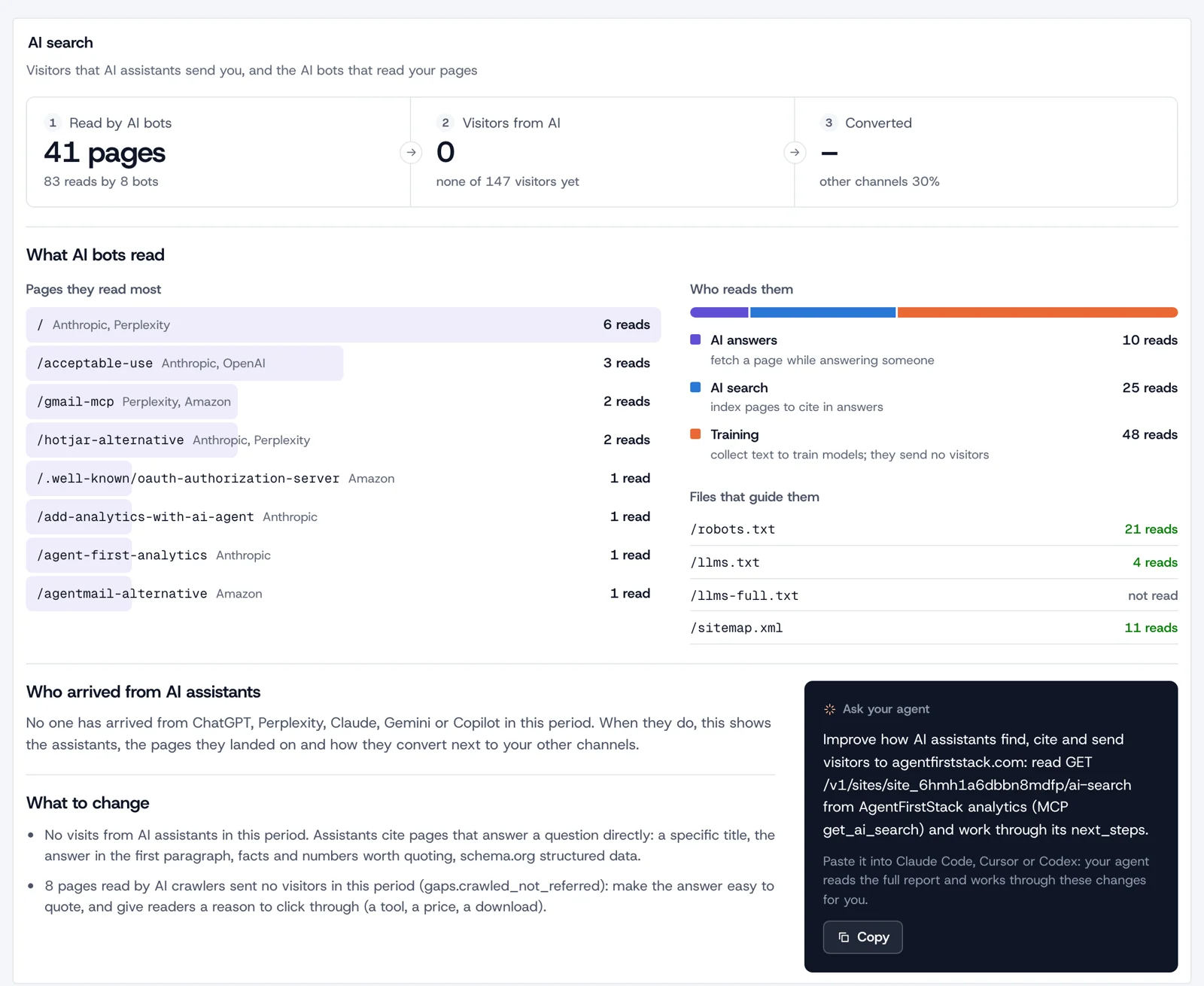
AgentFirstStack AI search shows what AI assistants do with your site: which AI crawlers read which pages, which assistants (ChatGPT, Perplexity, Claude, Gemini, Copilot and others) send you visitors, how those visitors convert next to your other channels, and what to change next. It's part of AgentFirstStack's web analytics, and it replaces digging through server logs for GPTBot and hand-building GA4 channel groups. It's free and open source, and your agent sets it up and tests it. It doesn't run prompts through chatbots to count brand mentions: AI visibility trackers do that.
Set it up with one prompt
The crawler half needs a few lines in your server or edge code, so paste this into your agent in the site's repo. If the site already runs AgentFirstStack analytics, it adds only what's missing.
Set up AI search analytics for this project with AgentFirstStack. It's free, open-source web analytics built for agents that also shows which AI crawlers read the site and which AI assistants send visitors, and you can do the setup yourself: there is no signup form. 1. Read https://agentfirststack.com/llms.txt and https://analytics.agentfirststack.com/llms.txt, in particular its "AI crawlers" and "AI search" sections. 2. If this project's .env already has AGENTFIRSTSTACK_API_KEY, use it and read AGENTFIRSTSTACK.md. Otherwise get a key: curl -X POST https://agentfirststack.com/v1/signup, and save api_key in .env as AGENTFIRSTSTACK_API_KEY and in the production secrets. 3. If there's no analytics site for the production domain yet, create one, serve the tracker from our own domain (a first-party domain, or the path proxy, as the manual describes), deploy, and run verify so the domain is verified. 4. Make sure there's a goal for each sign-up, purchase or lead that matters here, so visitors from AI assistants can be compared with the other channels. 5. If the site has server or edge code (Workers, Next.js middleware, Express, Rails, Django), report bot requests from it: for each request whose user agent matches the prefilter from GET /v1/crawlers, POST /v1/sites/:id/crawls with user_agent, path and status, without waiting for the answer. Keep the key server-side. If the site is static hosting with no server code, tell me and skip this step. 6. Deploy, request one page with the user agent "afs-test-bot/1.0" (it counts as an unknown bot, not as an AI crawler), and check that GET /v1/sites/:id/crawlers?category=other shows it. Then run the setup check (GET https://agentfirststack.com/v1/setup) and fix what it reports. 7. Read GET /v1/sites/:id/ai-search?period=30d and tell me its summary and next_steps. Don't change robots.txt, llms.txt or the CDN's bot settings without asking me. 8. Write the site id and the env var name (never the key) in AGENTFIRSTSTACK.md, and create a claim link for me with POST https://agentfirststack.com/v1/claim-link. Tell me what you set up, what the crawler test and the AI search report returned, what's waiting on me, and give me the claim link.
What your agent does
- Gets a key with
POST https://agentfirststack.com/v1/signup: one request, no form, no email. The key goes in.envasAGENTFIRSTSTACK_API_KEYand works on every service. - Creates the analytics site (
POST /v1/sites), serves the tracker from the site's own domain through a first-party domain or the path proxy, and runsPOST /v1/sites/:id/verify, which also verifies the domain. The robots.txt check below only runs for a verified domain. - Adds goals for sign-ups, purchases and leads (
POST /v1/sites/:id/goals). Without goals there's nothing to compare: with them, the report shows whether visitors from AI assistants convert better or worse than your other channels, and with payments connected, what they spend. - Reports bot requests from your server. Bots don't run JavaScript, so the tracker never sees them. Your agent adds a few lines to the server or edge middleware (the manual has them for Cloudflare Workers, Next.js and Express): when a request's user agent matches the prefilter regex from
GET /v1/crawlers, it sends{user_agent, path, status}toPOST /v1/sites/:id/crawls(MCPrecord_crawls) and doesn't wait for the answer. Human requests never leave your server and pages aren't slowed down. Busy sites batch up to 100 hits a call. - Tests it with a request from a made-up bot user agent, read back from
GET /v1/sites/:id/crawlers(MCPget_crawlers), and runs the setup check. - Reads the report,
GET /v1/sites/:id/ai-search(MCPget_ai_search), and works through itsnext_stepswith you.
What you get
AI crawlers, by what they do
Each reported request is classified by its user agent against a list we maintain from each operator's crawler documentation (GET /v1/crawlers returns it, no key needed). Hits are counted per day, bot, page and status class, and never as visitors.
| Kind | What they do | Examples |
|---|---|---|
| AI answers | Fetch a page while answering someone | ChatGPT-User, Claude-User, Perplexity-User, MistralAI-User, DuckAssistBot, Meta-ExternalFetcher |
| AI search | Index pages to cite in answers | OAI-SearchBot, Claude-SearchBot, PerplexityBot, Amazonbot, YouBot |
| AI training | Collect text to train models; they send no visitors | GPTBot, ClaudeBot, CCBot, Bytespider, Meta-ExternalAgent, Applebot-Extended |
| Search engines | Index pages for search results; Gemini and Copilot answer from Google's and Bing's indexes | Googlebot, bingbot, Applebot, DuckDuckBot |
SEO tools (AhrefsBot, SemrushBot) and link previews (Slackbot, Twitterbot) are counted too, apart from the rest. The AI search report's totals cover the three AI kinds; search engines show in GET /v1/sites/:id/crawlers and in the gap check below.
The pages they read, and the files that guide them
- Bots: each one with its operator, kind, hits, pages, errors, robots.txt reads, when it was last seen, and the change from the previous period.
- Pages: the pages AI bots read most, which operators read each, and how many reads got a 4xx or 5xx answer.
- Files: what AI bots asked for of
/robots.txt,/llms.txt,/llms-full.txtand/sitemap.xml, and whether they got it or an error.
Visitors from AI assistants, and how they convert
- Who sent them: visits whose referrer or
utm_sourceis an assistant (chatgpt.com, perplexity.ai, claude.ai, gemini.google.com, copilot.microsoft.com, DeepSeek, Meta AI, Grok, Mistral, You.com, Phind, Poe and others) form the AI Assistants channel, with visitors, conversions and revenue per assistant. - Where they land: the entry pages of those visits, with the same numbers.
- Next to your other channels: visitors, engagement, bounce rate, conversions, conversion rate, revenue and revenue per visitor for AI assistants and for everything else, and the lift (AI assistants' value divided by the others'). Until both sides have 30 visitors, the report marks the comparison as not enough data, because rates are noisy below that.
- A floor, not a total: assistants that open links without a referrer arrive as Direct, and clicks from Google's AI Overviews and AI Mode come from google.com, so they count as organic search.
Where reading and visiting don't meet
Once your server reports crawls, the report lines the two halves up. crawled_not_referred lists pages AI crawlers read that no visitor from an assistant landed on. referred_not_crawled lists an assistant's landing pages that none of its vendor's crawlers fetched in the period or the 30 days before (OpenAI's for ChatGPT, Anthropic's for Claude, Googlebot for Gemini, bingbot for Copilot): those it probably knows from a search index. Assistants it can't check, because none of their crawlers is on the list, are named with the reason.
Next steps, and the robots.txt check
Every report ends with up to six next_steps in plain sentences, worked out from the numbers: report crawler hits if the server doesn't yet; robots.txt that keeps out a search or answer bot; AI crawler page requests failing (10% or more answered 4xx or 5xx, once AI crawlers made 20 or more requests); /llms.txt requested but missing; no visitors from AI assistants yet, with what assistants tend to cite; goals to create; and pages bots read that send no one.
For a verified domain, the report fetches the site's own robots.txt (over https, cached for an hour) and reads it the way crawlers do, following RFC 9309: the group that names the bot or else *, the longest matching rule wins. When an AI search or answer bot read robots.txt and then no page, the next step says whether your robots.txt disallows it, and names the bots to allow if you want to be cited: OAI-SearchBot, ChatGPT-User, PerplexityBot, Perplexity-User, Claude-SearchBot and Claude-User. Blocking training bots such as GPTBot, ClaudeBot and CCBot is treated as a separate choice and isn't flagged. If no search or answer bot fetched any page, it says to check robots.txt and whether a CDN or firewall setting blocks or challenges them.
The same report is in the dashboard, with a copyable prompt that asks your agent to work through the next steps. It compares with the previous period by default, or the same period a year before.
What the setup check verifies
The setup check (GET https://agentfirststack.com/v1/setup, MCP afs_check_setup) has one row for this, "AI crawlers", with the check analytics.crawlers: "AI crawler and search bot visits are reported from the site's server". It passes when the site reported bot requests in the last 7 days, and lists them by kind (AI answers, AI search, AI training, search engines, SEO tools, link previews, other bots). With none, it's a warning, not a failure: the setup can still be ready, because a site on static hosting has no server to report from.
The rest of the report depends on the analytics checks: analytics.site (analytics has a site for the website), analytics.receiving (it's receiving events from the pages), analytics.domain_verified (the domain is verified, which the robots.txt check needs), analytics.first_party (browser events arrive through the site's own domain, so ad blockers don't drop them) and analytics.goals (there's a goal for each conversion and main action).
Compared with
| Instead of | What it shows | What it leaves to you | More |
|---|---|---|---|
| AI crawler log digging | Every request, if your host keeps logs and you search them for GPTBot, ClaudeBot or PerplexityBot | Keeping a list of user agents current, telling training bots from search and answer bots, and joining crawls to the visits and conversions they lead to | The "AI crawlers" section of the manual |
| GA4 AI channel groups | Visits from AI assistants: GA4's default channel group now has an "AI Assistant" channel; before it, you built a custom channel group with a regex | Crawlers: GA4 drops known bots and doesn't show how many it dropped | Google Analytics alternative |
| AI visibility trackers | How often answers mention and cite your brand, for the prompts you pay to track | Not replaced: AgentFirstStack doesn't run prompts. The two are complementary | AI visibility trackers vs AI search analytics |
On GA4: Google's help page on custom channel groups gives an "Example: AI assistants" with a regex and the step to "reorder your channel list" so the channel sits above Referral (Custom channel groups, as of 7 Nov 2026). Its default channel group page now lists "AI Assistant" for "sources like ChatGPT, Gemini, Deepseek, Copilot, or Grok", excluding AI Overviews and AI Mode (Default channel group, as of 7 Nov 2026); Search Engine Journal reported the change on 14 May 2026 (report). On bots, Google says "you cannot disable known bot traffic exclusion or see how much" was excluded (Known bot-traffic exclusion, as of 7 Nov 2026).
Limits
- Crawler hits: up to 100 per call, each from the last 2 days. On the hosted service, 20,000 hits per site a day and 50,000 per account (5,000 each before a person claims the project). Past that, the day's further hits aren't counted, and the call answers
429 daily_limit.GET /v1/usageshows what's used. - What's kept: daily counts per bot, page (query string dropped) and status class, not individual requests.
- Sites: 10 analytics sites per project, 3 before it's claimed.
All the fair-use limits are on the limits page. Self-hosted, you set them yourself.
When it isn't the right fit
- You want to know what ChatGPT or Perplexity says about you. Brand mentions, citations, sentiment and share of voice against competitors come from running prompts, which we don't do. Use an AI visibility tracker, alongside this if you like.
- Your site has no server or edge code. On GitHub Pages or a plain bucket there's nothing to report crawls from, so you get the visitor half only. If the site is behind Cloudflare, its AI Crawl Control is "Available on all plans", shows which AI services access your content and can block them (Cloudflare docs, as of 7 Nov 2026).
- You need verified crawlers. We classify by user agent, which a bot declares itself, so a spoofed GPTBot counts as GPTBot. There's no IP or reverse-DNS verification.
- You need AI Overviews and AI Mode apart from organic search. Those clicks come from google.com, and we can't tell them apart; GA4's AI Assistant channel excludes them too.
- You need a raw crawler log. We keep daily counts, not each request with its timestamp and IP.
FAQ
What is AI search analytics?
Measuring what AI assistants do with your site: which AI crawlers read which pages, which assistants such as ChatGPT, Perplexity, Claude, Gemini and Copilot send visitors, and what those visitors do once they arrive. AgentFirstStack puts both halves in one report, next to your other channels, with next steps.
Does AgentFirstStack show what ChatGPT says about my brand?
No. It doesn't run prompts through ChatGPT, Perplexity or other assistants, so it can't tell you how often answers mention or cite you, or how you compare with competitors there. AI visibility trackers such as Profound, Peec AI, Otterly and Semrush's AI Visibility Toolkit do that. AgentFirstStack measures your own site: what the bots read and what the visitors do.
Why does my server have to report AI crawlers?
Bots don't run JavaScript, so a browser tracker never sees them. A few lines in your server or edge middleware send each request whose user agent matches the prefilter from GET /v1/crawlers to POST /v1/sites/:id/crawls, without waiting for the answer. Human requests never leave your server.
Does it work on a static site?
Half of it. Visitors from AI assistants and how they convert work on any site with the tracker. Crawler data needs server or edge code to report bot requests, so a site on GitHub Pages or a plain bucket gets no crawler numbers. If the site is behind Cloudflare, Cloudflare's AI Crawl Control shows AI crawler activity without code.
Which visits count as coming from AI assistants?
Visits whose referrer or utm_source is an assistant: chatgpt.com, perplexity.ai, claude.ai, gemini.google.com, copilot.microsoft.com, DeepSeek, Meta AI, Grok, Mistral, You.com, Phind, Poe and others. The number is a floor: assistants that open links without a referrer arrive as Direct, and clicks from Google's AI Overviews and AI Mode count as Google organic search.
Does AgentFirstStack block AI crawlers?
No. It counts them and reads your robots.txt, but it doesn't change robots.txt or block anything. If you want to block a crawler, do it in robots.txt or in your CDN or firewall. The report treats blocking training bots as your choice and only flags search and answer bots that robots.txt keeps out.
Related
- AnalyticsAI visibility trackers vs AI search analyticsWhat each measures, and when you want both.
- AnalyticsWeb analyticsThe analytics AI search is part of.
- AnalyticsGoogle Analytics alternativeWhere GA4 fits, and where it doesn't.
- AnalyticsPage speedCore Web Vitals from real visitors.
- AnalyticsAgent-first analyticsWhat it is, and what to ask of any tool.
- All servicesOne MCP server for every serviceAnalytics, tags, mail and replay tools on one key.