Web analytics your AI agent sets up
AgentFirstStack Analytics is cookieless web analytics: where visitors come from (AI assistants included), what they do, which goals they reach and what they pay, with funnels, MRR, AI crawler reports and Core Web Vitals. It replaces Google Analytics, Plausible, DataFast and Fathom, it's free on the hosted service, and it's open source (AGPL-3.0, the tracker MIT). An AI agent sets it up alone: one request for a key, a site, the snippet served from your own domain, a goal for each conversion, history from your old tool, then a test it runs itself. You claim the dashboard with a link.
Set it up with one prompt
Paste this into your coding agent. It maps the site first, so every button and form that matters gets a goal, and it leaves the analytics you run today in place.
Add web analytics to this project with AgentFirstStack. It's free, open-source, cookieless analytics built for agents, and you can do the setup yourself: there is no signup form. 1. Read https://agentfirststack.com/llms.txt and https://analytics.agentfirststack.com/llms.txt. 2. If this project's .env already has AGENTFIRSTSTACK_API_KEY, use it and read AGENTFIRSTSTACK.md. Otherwise get a key: curl -X POST https://agentfirststack.com/v1/signup, and save api_key in .env as AGENTFIRSTSTACK_API_KEY and in the production secrets. 3. Map the site before you change it: the main pages, every primary button, link and form, the thank-you pages, and what counts as a sign-up, lead or purchase here. Note any analytics it runs today (Google Analytics, Plausible, DataFast, Fathom or another) with its ids and event names, and leave it installed. 4. Create a site for the production domain and serve it from our own domain: add a first-party domain on a new subdomain with a neutral name such as edge (POST https://agentfirststack.com/v1/first-party-domains) and add its CNAME if you can change our DNS. Until it's active, or if you can't, use the path proxy from the install answer, with the proxy key kept server-side. Put the snippet in the head of every page. 5. Create a goal for each conversion and main action, keeping the old tool's event names. Send what only the backend knows (a paid order, a verified sign-up) as server events, with afsa.visitorId() passed through. If we take payments, connect the provider, and ask me for the key you need. 6. If the site ran another analytics tool, import its daily history as the manual's "Move from another tool" describes, up to today, so imports/compare can check our numbers against it. 7. If the site has server or edge code, report AI crawler requests from it. Add an email destination with a weekly report, and alerts for a traffic drop and for no data. 8. Deploy (or tell me what to deploy), open the site with ?afsa_debug=1 and use the main actions, run verify, then GET https://agentfirststack.com/v1/setup?services=analytics until it says ready. 9. Write the site id, every goal with what triggers it, and the env var name (never the key) in AGENTFIRSTSTACK.md, and create a claim link for me with POST https://agentfirststack.com/v1/claim-link. Tell me what you set up, what verify and the setup check returned, what's waiting on me, and give me the claim link.
Want analytics, tags, inboxes and replay in one run? The full setup prompt on the home page does all four.
What your agent does
Every step is a REST call on https://analytics.agentfirststack.com (or the platform host where noted) and an MCP tool on https://agentfirststack.com/mcp. Every create call is safe to repeat: it returns the existing thing.
- Gets a key.
POST https://agentfirststack.com/v1/signupreturns one key for every service, with no email or verification. It goes in.envasAGENTFIRSTSTACK_API_KEY. - Creates the site.
POST /v1/sites {"domain":"example.com"}(analytics_create_site) returns the site id and install code for HTML, Next.js, Astro, React and WordPress, led by the first-party options. - Serves it from your domain.
POST https://agentfirststack.com/v1/first-party-domains {"hostname":"edge.example.com"}(afs_add_first_party_domain) gives one CNAME tofp.agentfirststack.com. Once it's active, the snippet loads fromhttps://edge.example.com/_a/s.js, with no server code, so ad blockers that block analytics hosts don't drop visitors. Where DNS can't change, a path proxy on the site does the same. - Adds goals.
POST /v1/sites/:id/goals(analytics_create_goal): event goals for clicks and forms, pageview goals for thank-you pages, scroll goals for content. Goals apply to past data too. - Sends what the browser can't see.
POST /v1/sites/:id/events(analytics_track_events) for server events, with a dry run. Payments come from Stripe in one call with a restricted key (POST /v1/sites/:id/integrations/stripe/connect, 90 days of history), from Polar, Paddle and LemonSqueezy by webhook, or fromPOST /v1/sites/:id/payments. - Brings history over.
POST /v1/sites/:id/imports(analytics_import_csv) takes a GA4 report, a Plausible report or CSV, or rows from any tool.GET /v1/sites/:id/imports/compare(analytics_compare_import) then checks our daily visitors against the old tool's. - Reports AI crawlers. Bots don't run the tracker, so the site's server or edge code posts their requests to
POST /v1/sites/:id/crawls, fire-and-forget, filtered with the prefilter fromGET /v1/crawlers. - Sets up your reports. An email destination, a weekly report and alerts for a traffic drop and for no data (
/destinations,/reports,/alerts). They reach you once you claim the project. - Tests its own work.
POST /v1/sites/:id/verify(analytics_verify_install) fetches the live page and checks the snippet, the script, the Content-Security-Policy and the events. A visit with?afsa_debug=1is test traffic it can watch in realtime without touching your reports. ThenPOST https://agentfirststack.com/v1/setup/test(afs_test_setup) andGET https://agentfirststack.com/v1/setup(afs_check_setup). - Hands over.
POST https://agentfirststack.com/v1/claim-link(afs_create_claim_link) gives you a single-use link, valid for 7 days. You sign in with Google and see the dashboard.
What you get
- Tracking: a 2.8 KB (gzip) tracker; no cookies by default; pageviews in single-page and hash-routed apps; custom events and props, also from HTML attributes; outbound clicks and downloads; forms and 404s on request; scroll depth, engaged time and Core Web Vitals; site search; UTM tags and ad click ids; consent gating; cross-domain linking.
- Reports: stats, breakdowns by up to three dimensions, timeseries and comparisons, custom metrics, channel groups, realtime with a live WebSocket stream and a map, top movers, insights, CSV, and one rollup across your sites. Countries, regions and cities come from the edge.
- Goals and funnels: event, pageview and scroll goals with values, funnels in order or any order, within a visit or up to 30 days, with revenue per step, and saved segments.
- People: visitors, sessions linked to replay recordings, journeys to a goal, first touch, retention cohorts, path exploration and six attribution models.
- Revenue and MRR: payments joined to the visit that brought them; MRR, ARR, churn and trial conversion by channel, campaign, country or plan; ad spend for ROAS, CPA and CAC. More on the revenue analytics page.
- AI search: which AI crawlers read which pages (reported by your server), which assistants send visitors and what those visitors do, the pages read but never visited, and next steps. It doesn't run prompts through ChatGPT or Claude to measure brand mentions. More on the AI search page.
- Page speed: Core Web Vitals from real visitors at the 75th percentile, by page, device, country and browser, slowest pages first, plus a PageSpeed Insights lab run on demand. More on the page speed page.
- Data out: raw events as NDJSON, CSV or JSON, read-only SQL with cost limits, and a schema call that lists every event and property.
- For you: the dashboard, public share links with a password, an expiry or a saved segment, and alerts and weekly or monthly reports by email, Slack or webhook.
- Privacy: erase one visitor, purge by filter with a dry run, email and phone redaction, path rules, exclusions, a referrer spam filter, Do Not Track and GPC, and attack protection that quarantines floods instead of counting them.
Every endpoint, field and MCP tool is in the analytics manual, and the features page lists the other services.
Our own site, in the same dashboard
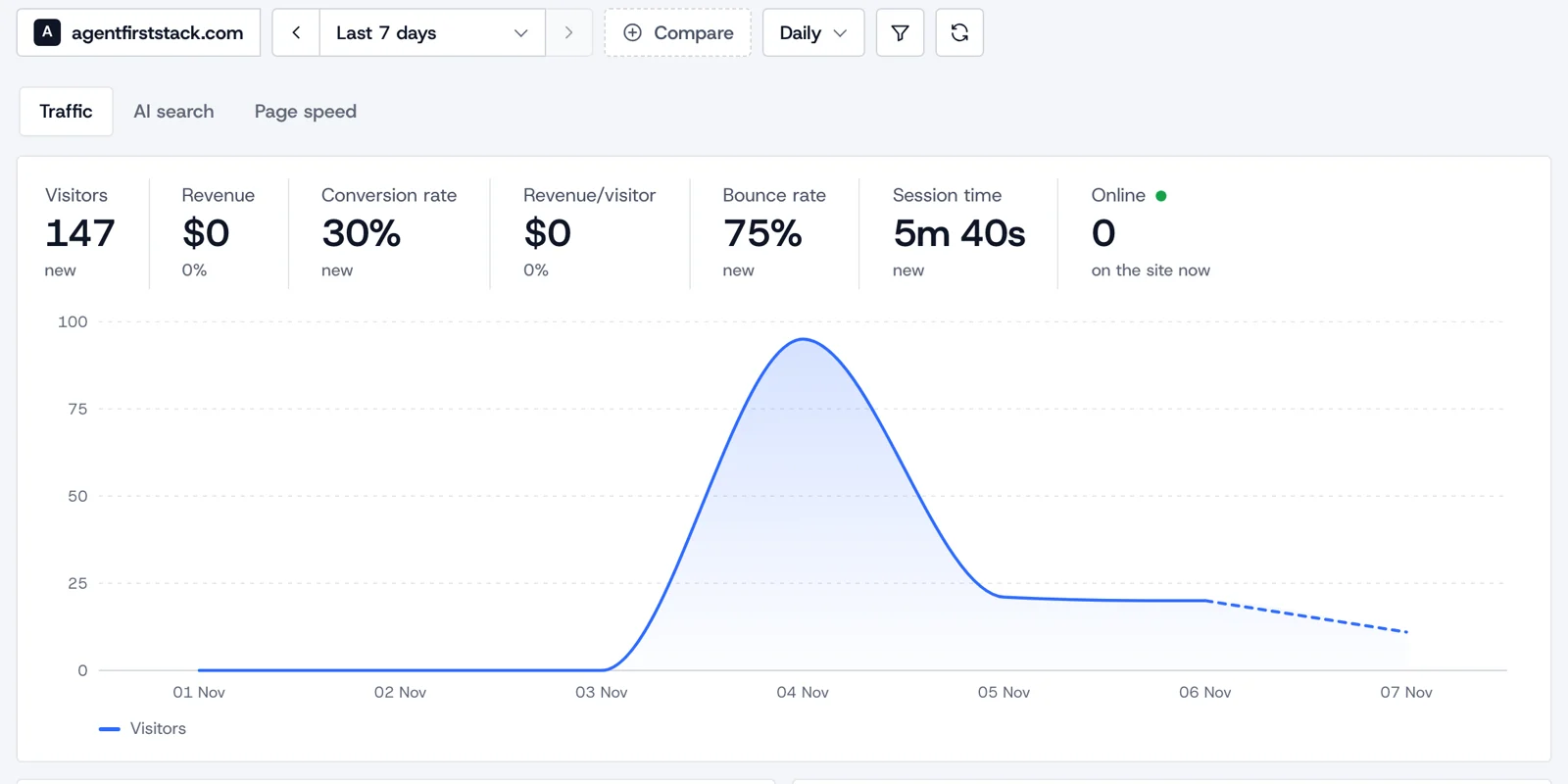
These are real numbers, not a demo account. Our own analytics are live on the home page, counted by the same cookieless tracker your agent installs, and the full dashboard is a public share link of the kind your agent can make for your site.
What the setup check verifies
GET https://agentfirststack.com/v1/setup?services=analytics (afs_check_setup) reads what the service has received and returns "ready": true or a fix for each row. For analytics it checks:
| Check | What it means |
|---|---|
analytics.site | Analytics has a site for the website |
analytics.first_party | Browser events arrive first-party (through the site's own domain), so ad blockers don't drop them |
analytics.receiving | Analytics is receiving events from the pages |
analytics.domain_verified | The site's domain is verified |
analytics.proxy_key | Events through a first-party proxy carry its proxy key |
analytics.goals | There is a goal for each conversion and main action |
analytics.goals_counted | Every goal has counted at least once (test traffic included, last 30 days) |
analytics.server_events | Conversions only the backend knows arrive as server events (a warning only: not every site has them) |
analytics.crawlers | AI crawler and search bot visits are reported from the site's server |
analytics.owner_email | The owner gets email from analytics |
analytics.weekly_report | A weekly report goes to the owner |
analytics.alerts | Alerts fire on a traffic drop and when tracking stops |
When the project also has a tag container, whose scan finds the tools a site already loads, two more rows follow a move from another tool: migrate.tools (what the site used before is brought over) and migrate.compare (our daily visitors match the old tool's, for the days both ran). The setup test (POST https://agentfirststack.com/v1/setup/test) runs analytics.test_event: a test event reaches analytics. The check fetches nothing from the site, so the agent deploys and makes its test visit first.
Compared with
| Tool | What it is (as of 7 Nov 2026) | What AgentFirstStack does differently | Comparison |
|---|---|---|---|
| Google Analytics 4 | Free; Analytics 360 is sold under a contract. Creating the account takes a person, and its tag sets _ga cookies that last 2 years (Google). | No cookies by default, one request to start, and GA4's history imported as daily totals | Google Analytics alternative |
| Plausible | Open-source, cookieless analytics hosted in the EU, from $9 a month for 10k pageviews after a 30-day trial (plausible.io) | Free hosted; MRR, replay and a tag manager on the same key; your agent can create sites on every plan | Plausible alternative |
| DataFast | "Revenue-first analytics" with Stripe, LemonSqueezy, Polar and Shopify integrations, and a 14-day trial (datafa.st) | Revenue and MRR too (Stripe, Polar, Paddle, LemonSqueezy or any provider by API), free and open source | DataFast alternative |
| Fathom | Analytics from $15 a month for up to 100,000 pageviews across 50 sites, with "No cookie banners required"; no free plan (usefathom.com/pricing) | Free hosted with fair-use limits; goals, funnels, revenue and MRR; set up by your agent | Fathom alternative |
Using Umami? The Umami alternative page compares two open-source tools.
Limits
The hosted service is free at any size within the fair-use limits, the same for every project:
- 10 analytics sites per project, 3 before a person claims it.
- Up to 400 days of history: raw events older than the site's
retention_daysare deleted daily. - Daily event budgets per site and per account, with a separate budget for server events and payments, so a flood of browser events never refuses what your backend sends. One network's events past its daily share are quarantined, not counted.
- 300 API reads a minute per project on each service.
GET https://agentfirststack.com/v1/usage shows every limit with what the project has used. Need more? Run your own copy: pnpm afs init <name> --domain example.com --account <id>, then pnpm afs deploy <name>.
When it isn't the right fit
- Long history. The hosted service keeps up to 400 days of raw events. Imported history stays as daily totals, but year-over-year detail beyond that needs a self-hosted copy with a longer retention.
- Mobile apps. There's no SDK for iOS or Android. The tracker is for websites; backends send server events.
- Anonymous visitors across days. Cookieless ids rotate daily, so returning visitors and multi-day attribution work for identified users (a
user_idfrom your server) or in persistent mode, not for anonymous visitors. - The Google ecosystem. There are no Google Ads audiences, BigQuery export or Search Console integration. Our tag manager can keep sending conversions to GA4 and Google Ads if you need them.
- Data-driven attribution. The six models are rule-based; data-driven models aren't offered.
- A dashboard as the main tool. The dashboard shows traffic, goals, visitors, AI search and page speed. MRR, attribution models and retention cohorts are in the API and MCP, for your agent to read and summarise.
- EU-only hosting. The hosted service runs on Cloudflare and doesn't offer EU-only data storage.
FAQ
Does AgentFirstStack Analytics use cookies?
No. By default a visitor is a hash of a daily salt, the site, the IP address and the user agent, the salt rotates every day, and nothing is stored on the device. An opt-in persistent mode keeps a random id in localStorage; the tracker can wait for consent with data-require-consent.
What does my agent need from me?
Usually only a few things: the DNS record for the first-party domain if it can't change your DNS, a deploy if it can't deploy, a payment provider key if you take payments, and your click on the claim link. Everything else, from the key to the goals and the tests, it does alone.
Can it bring over my Google Analytics or Plausible history?
Yes, as daily totals and breakdowns by page, source, country and device: a GA4 Data API report or CSV export, a Plausible Stats API report or CSV export, or rows from any other tool. Then imports/compare checks our daily visitors against the old tool's for the days both ran.
Is it really free?
The hosted service is free at any size within the fair-use limits, such as 10 analytics sites per project and up to 400 days of history. The code is open source under AGPL-3.0, with the tracker under MIT, and you can run your own copy on Cloudflare with your own limits.
How do I see the numbers?
Open the claim link your agent gives you and sign in with Google to see the dashboard, or ask your agent, which reads every report over REST and MCP. Your agent can also make a public share link with a password, an expiry or a saved segment.
Related
- AnalyticsGoogle Analytics alternativeGA4's setup, cookies and limits, side by side.
- AnalyticsPlausible alternativeTwo cookieless, open-source tools compared.
- AnalyticsRevenue and MRRPayments joined to the visit that brought them.
- AnalyticsAI searchWhich AI bots read which pages, and who they send.
- AnalyticsPage speedCore Web Vitals from real visitors.
- AnalyticsAdd analytics with Claude CodeOne prompt: a key, a site, the snippet, a verify check.
- Tag managerOne snippet for every pixel and click event.
- ReplaySession replaySessions as transcripts, masked by default.
- All servicesOne MCP server for every serviceAnalytics, tags, mail and replay tools on one key.